
This page is always under contruction!!!

Turn up overall power of your device while using PianoDisc Remote App




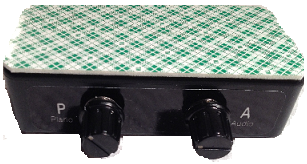
This App will not give you balance control over YouTube videos, or PianoDisc DVDs. If you'd like to have that extra control, you'll need a mechanical "Balance Control Box". If you put a Balance Control Box on your piano, you can still use PianoDisc Remote App. You simply turn up the Piano and Audio volume knobs all the way. This makes it so that they are invisible to the App.

Click here to make your piano even better!

HOW TO SAVE YOUR OPTIMIZATION SETTINGS AND RECALL THEM LATER---Very detailed explanation of everything... Sorry a little too long! Lots of info though!! :)



The next update of this app will have the following improvements:
*When you hit done button in youtube, the song will stop.
*PianoDisc Radio will have a master volume control
*Master volume level will be remembered for optimized songs with master in/out of main.
*Video Button on Main Page if desired
*Only play PD music if desired--Device will only bring up pd songs...will ignore everything else
*Change optimize button to Set Volume Window
*Streaming window fast forward and rewind....will advance album covers automatically
*Possibly have a button that Spin button that spins through the album just for fun!
*Sync in settings 0000 code to prevent user from doing too much with sync settings.
*Apply sync to an entire album if desired
*Song says if it has been synced
*Change "Sample User Content" to "PD Remote on YouTube"
*Date and time bigger. Actual day displayed on calendar page.
*Name on drawer bigger
*Presets apply to an entire album remember them.
*Show battery charge level in Main
*Fix add all songs bug with ipad version...now you have to push one song and then you can add all
*Remember scheduled songs...Right now if you program the piano to play 5 minutes from now it will but it will not repeat a week from now.
*When you hit done button in youtube, the song will stop.
*PianoDisc Radio will have a master volume control
*Master volume level will be remembered for optimized songs with master in/out of main.
*Video Button on Main Page if desired
*Only play PD music if desired--Device will only bring up pd songs...will ignore everything else
*Change optimize button to Set Volume Window
*Streaming window fast forward and rewind....will advance album covers automatically
*Possibly have a button that Spin button that spins through the album just for fun!
*Sync in settings 0000 code to prevent user from doing too much with sync settings.
*Apply sync to an entire album if desired
*Song says if it has been synced
*Change "Sample User Content" to "PD Remote on YouTube"
*Date and time bigger. Actual day displayed on calendar page.
*Name on drawer bigger
*Presets apply to an entire album remember them.
*Show battery charge level in Main
*Fix add all songs bug with ipad version...now you have to push one song and then you can add all
*Remember scheduled songs...Right now if you program the piano to play 5 minutes from now it will but it will not repeat a week from now.